
A Bible study app for phone, tablet and computer
Living Studies
The whole Bible, its places, people and feasts, in one offline study app.
Mount Sinai · photo credits
A preview of the story
One story, from heaven to the new earth.
The app's timeline opens before the world began, with Lucifer in heaven, and follows the great conflict between good and evil through the fall, the patriarchs, the kings and prophets, the life of Christ and the early church, to the new heaven and the new earth. Scroll through a few of its stops.
You've seen the opening
Continue the story.
Every stop above is a page in the app, with its Bible passages, people and places, and it all works offline.
- 7Bible translations
- 1,100+Bible places
- 100+people, with biographies
- 130+feasts and traditions
- 14,200+Hebrew and Greek words
- 270+world-history events
Open the Bible. Then step into its world.
Read in any of 7 public-domain translations, follow the story in time order, look up a place on the map, meet the people, explore the feasts and traditions through the year, and tap a word to see the Hebrew or Greek behind it. Everything sits in one app, and once it's saved it keeps working with no internet.
Built on sources
Every entry shows its homework.
Each published encyclopedia entry is checked against at least two outside sources from different publishers, and more than nine in ten have three or more. Each one lists them so you can check too. They include 19th-century Bible dictionaries, Josephus, and older reference works. Bible references sit beside the text, and paintings are labelled as later art, not likenesses.
See how entries work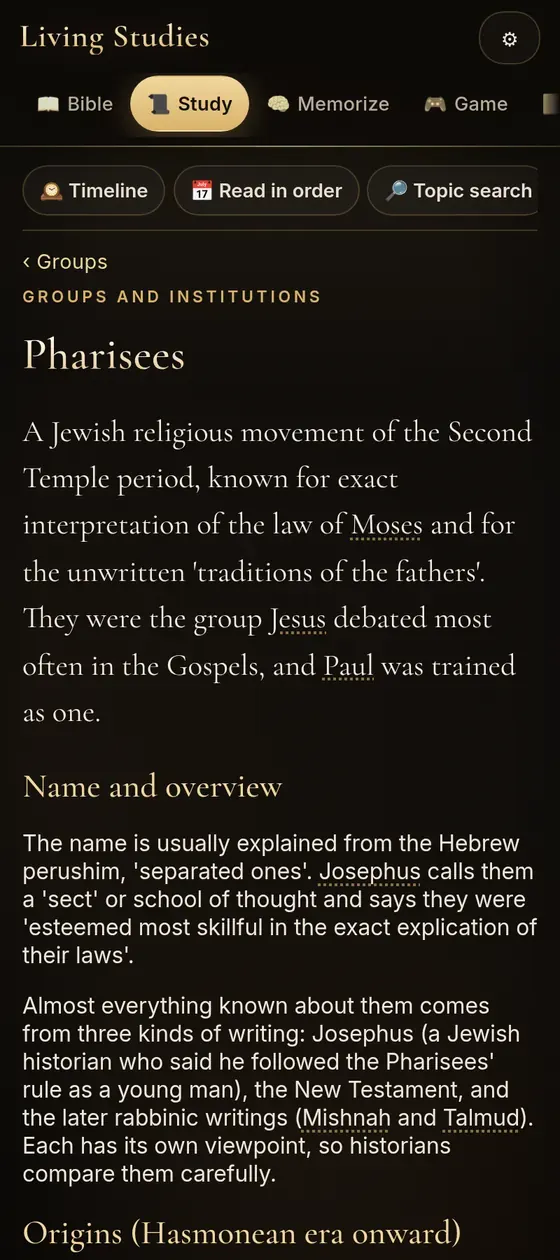
Want to help the work? Anyone can give monthly, with or without buying the app. It's optional and never needed to use it.
Read & Study
The whole story, in the order it happened.
7 translations, reading plans in chronological and book order, a Story of the Bible Timeline in 170+ short cards from before the world began to the new earth, and topic search you can type or speak.
7 translations, side by side
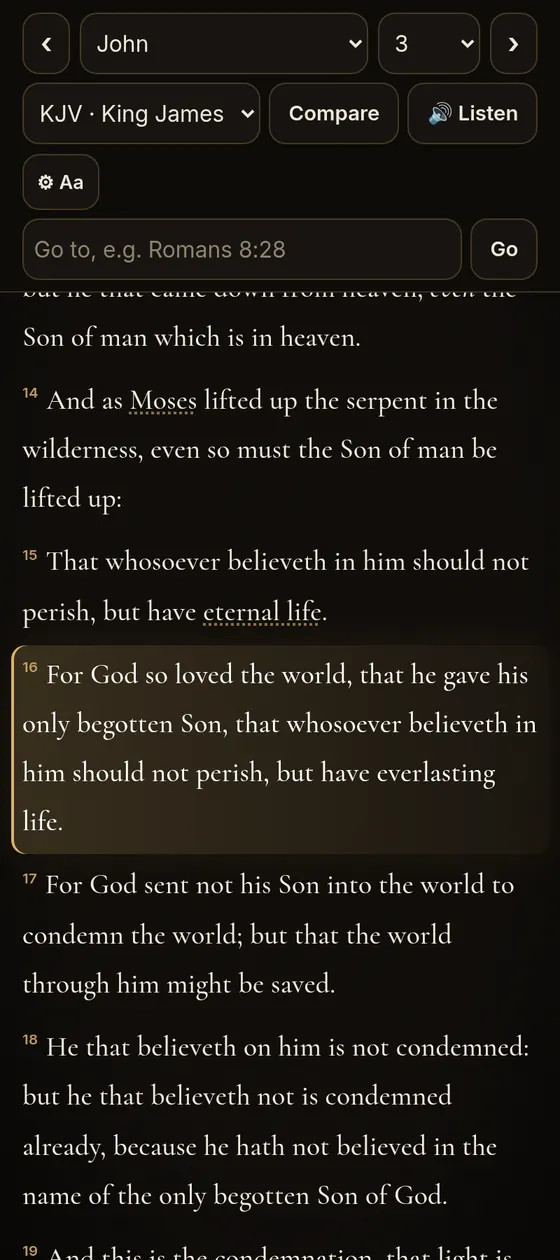
Compare passages side by side, or let the app read aloud. All 7 translations are in the public domain (in the UK, the King James Version is under Crown letters patent).
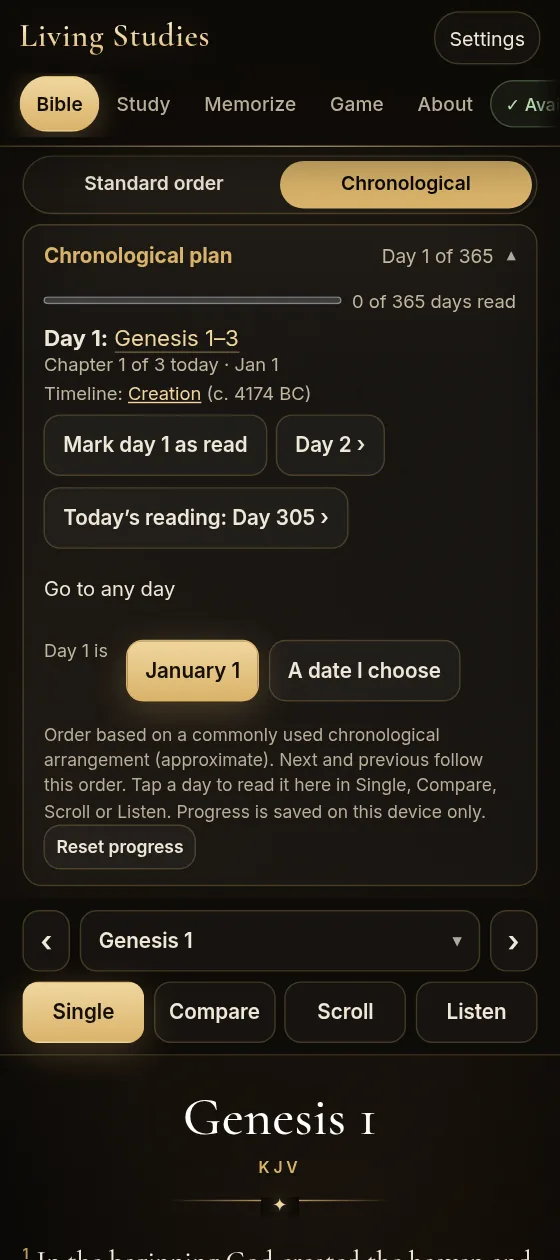
Read the Bible in chronological order
In the Bible tab, switch from Standard order to Chronological to read the books in the order the events happened, in Single, Compare, Scroll or Listen. A 365-day plan keeps your place day by day, and each day links to its place on the timeline. Prefer the usual order? Standard order has its own Bible in 365 days plan, in book order.
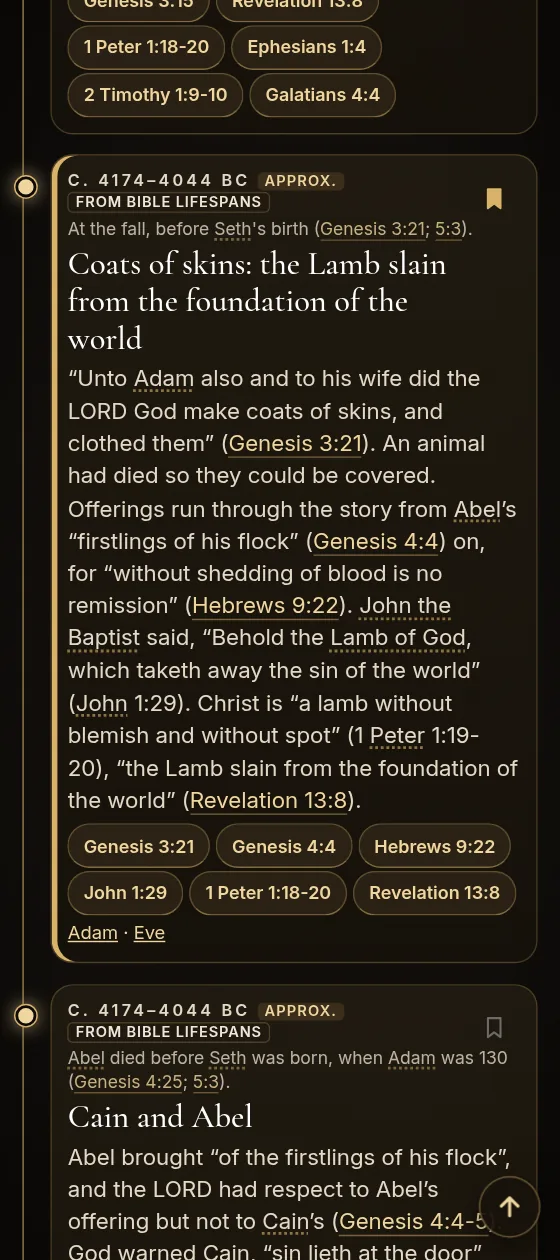
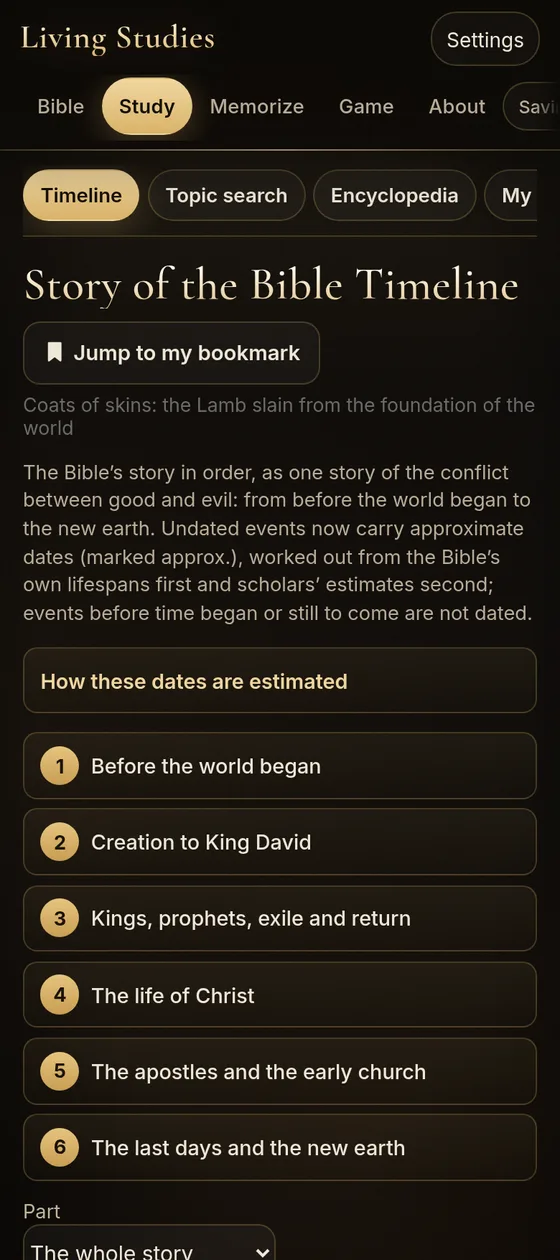
Story of the Bible Timeline
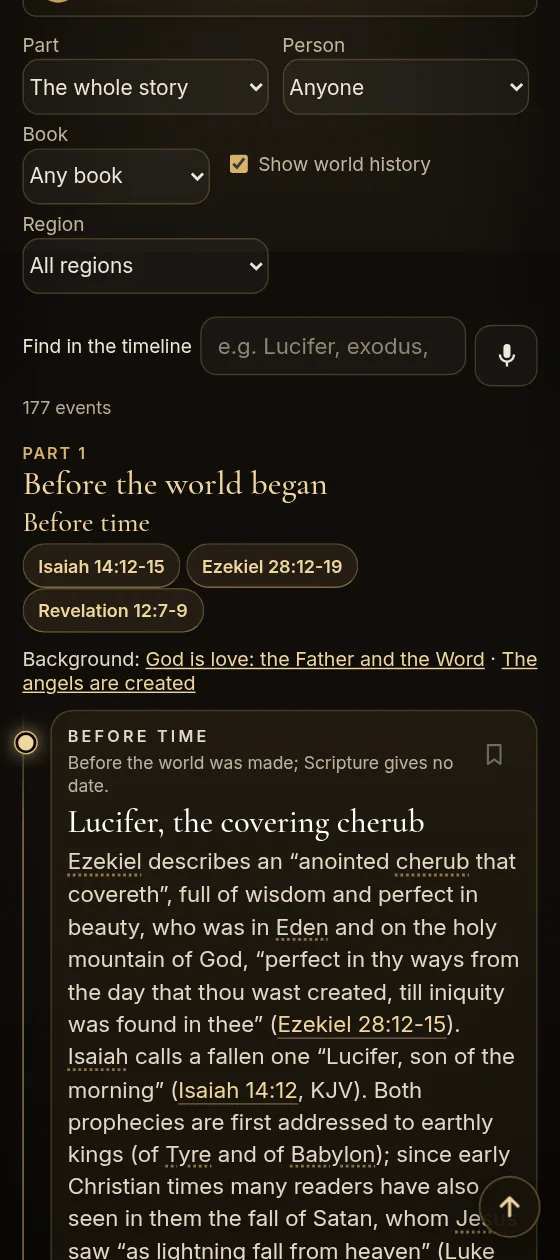
One timeline tells the Bible as one story of the conflict between good and evil, in 6 parts. It begins before the world began, with Lucifer in heaven, and ends with the new heaven and the new earth. Its 170+ cards are short, easy reads, each with the Bible verses behind it. Tap a verse to open the passage.
Along the way are cards on the six days of creation, the freedom to choose, the coats of skins and the Lamb, the flood told in five cards, the nations from Noah’s sons, Abraham keeping God’s commandments, the weekly manna, the Day of Atonement and Daniel’s prophecies. The last part follows the signs of his coming, the judgment, the three angels’ messages, the seal of God, the seven last plagues, the second coming, the thousand years and the new earth.
Dates marked approx. are estimates, worked out first from the ages the Bible gives and then from scholars’ estimates, and a short note in the app explains how. Events before the world began, and the last-day events the Bible does not date, have no date. Bookmark any card, and Jump to my bookmark takes you straight back to it.
World history beside the Bible
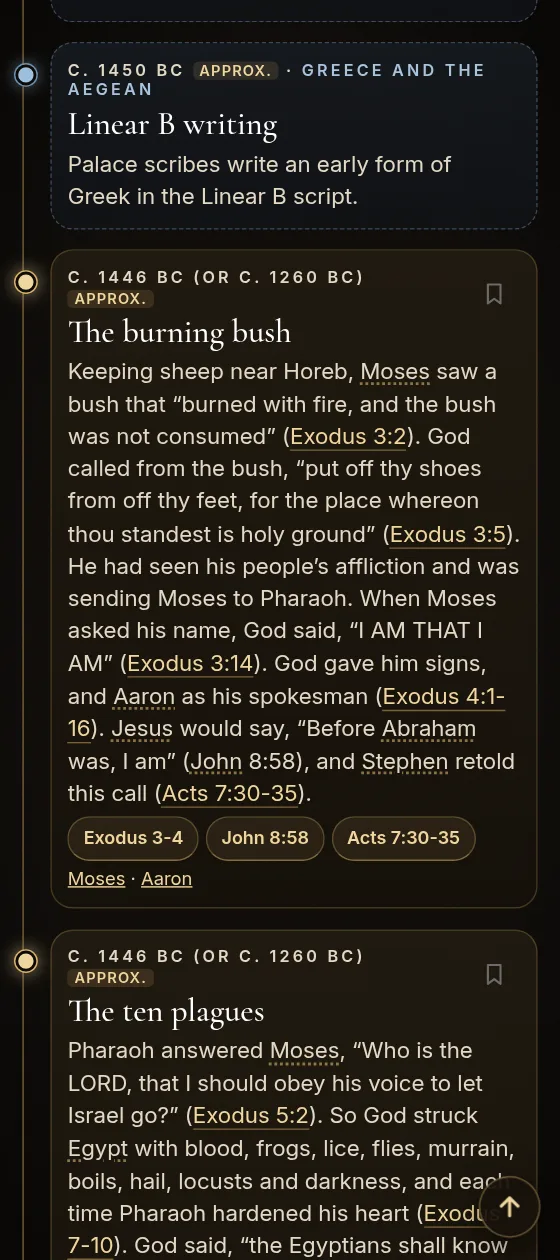
Tick Show world history on the timeline to see what was happening in the wider world at the same time. 270+ events from 13 regions, from the first cities of Uruk around 4000 BC to the Bar Kokhba revolt in AD 132–135, sit in their own cards among the Bible events, each placed by its date.
Each card gives the event’s title, date, region and a short summary. Tap one to read more, see the Bible events from around the same time, and check its sources, such as the World History Encyclopedia, Treccani and Livius.org. A Region menu narrows the list to one part of the world, such as Egypt, Mesopotamia, Greece and the Aegean, Rome and Italy, Persia and Iran, China or the Americas.
Each Bible event’s own page also shows what else was happening in the world around then.
Dates are the ones mainstream historians use. Dates before about 1000 BC are approximate and marked approx., and a note in the app explains that the earliest ones are shown as historians give them, not as settled fact. World-history notes come from the app’s sourced world-history entries.
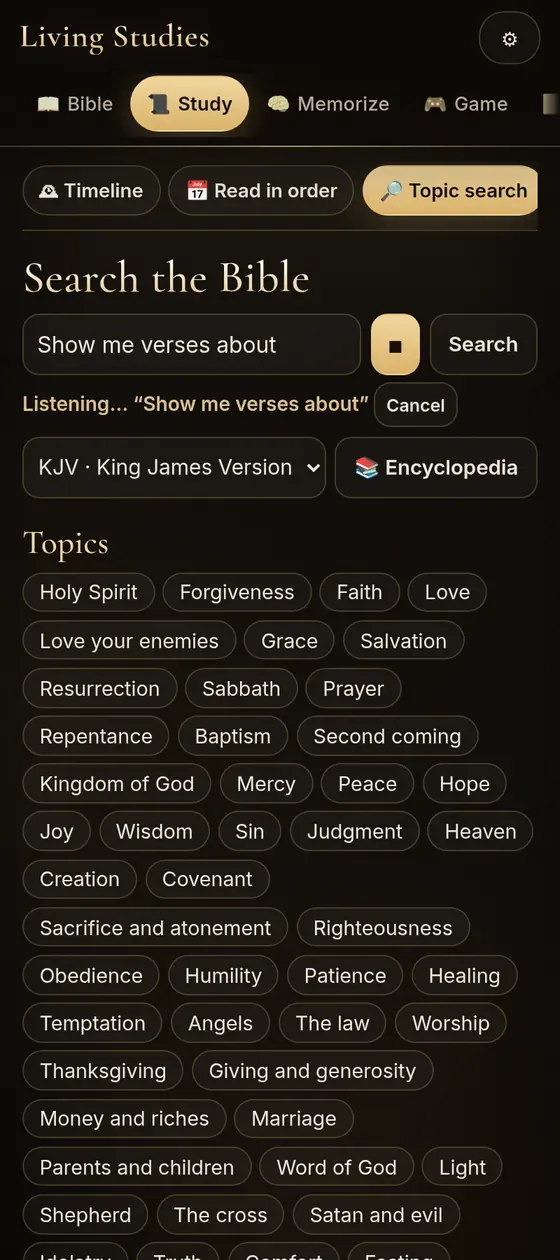
Search by topic, typed or spoken
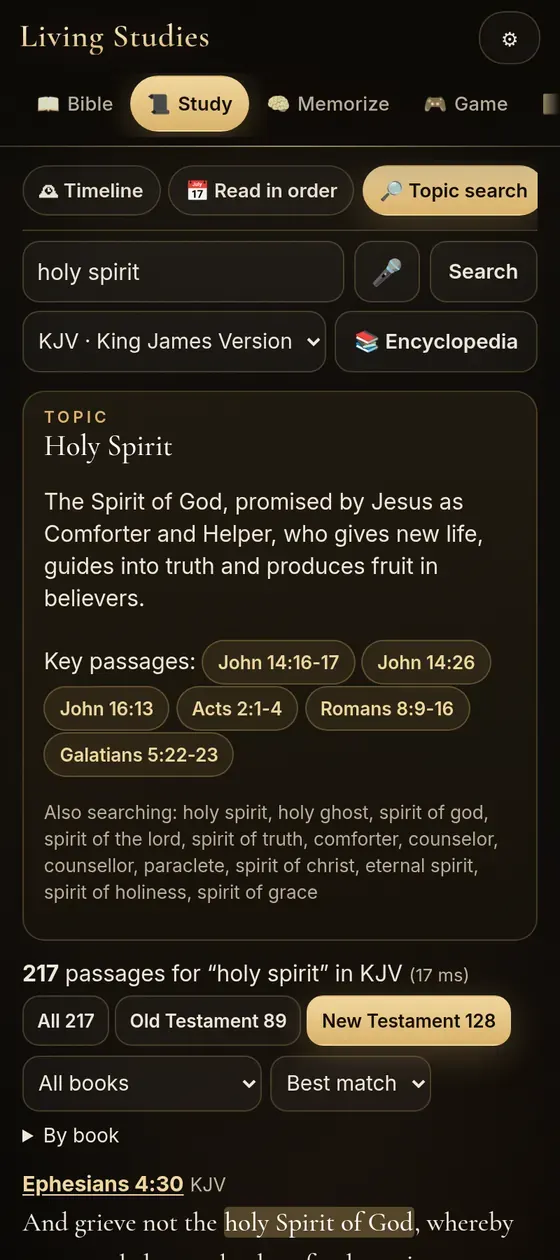
Ask in plain words, like find every passage on the Holy Spirit
or show me verses about forgiveness
. Results are ranked with the matching words highlighted, and can be filtered by Testament and book. 50+ topics know their synonyms, so Holy Spirit also finds Holy Ghost and Comforter.
Voice search uses your browser's speech recognition. On iPhone that means Safari and a one-time microphone permission. Some devices send the audio to Apple's or Google's speech service, so voice search may need internet even when the rest of the app is offline. Typing always works offline.
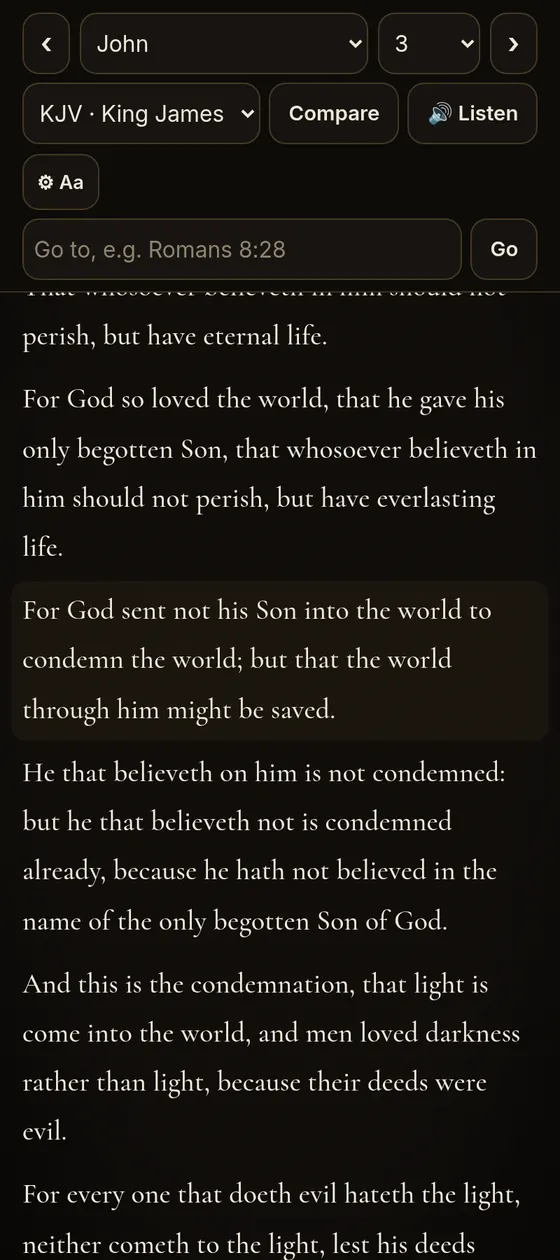
Read it your way
Turn verse numbers and chapter headings on or off, switch to continuous paragraphs instead of verse by verse, and show or hide encyclopedia links in the text. The app remembers your choices.
Hebrew & Greek
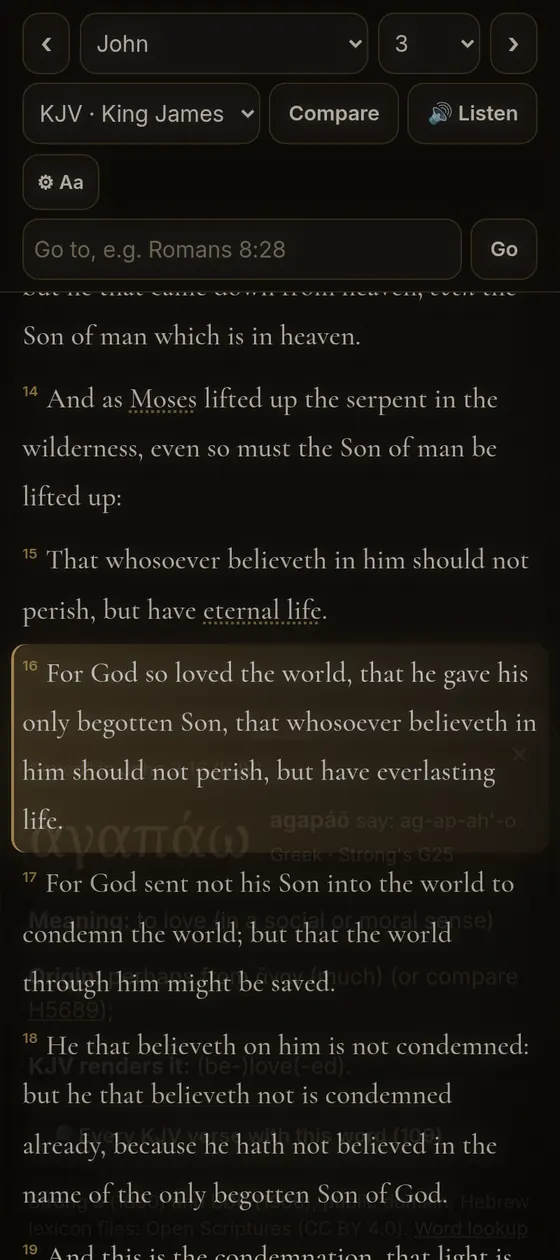
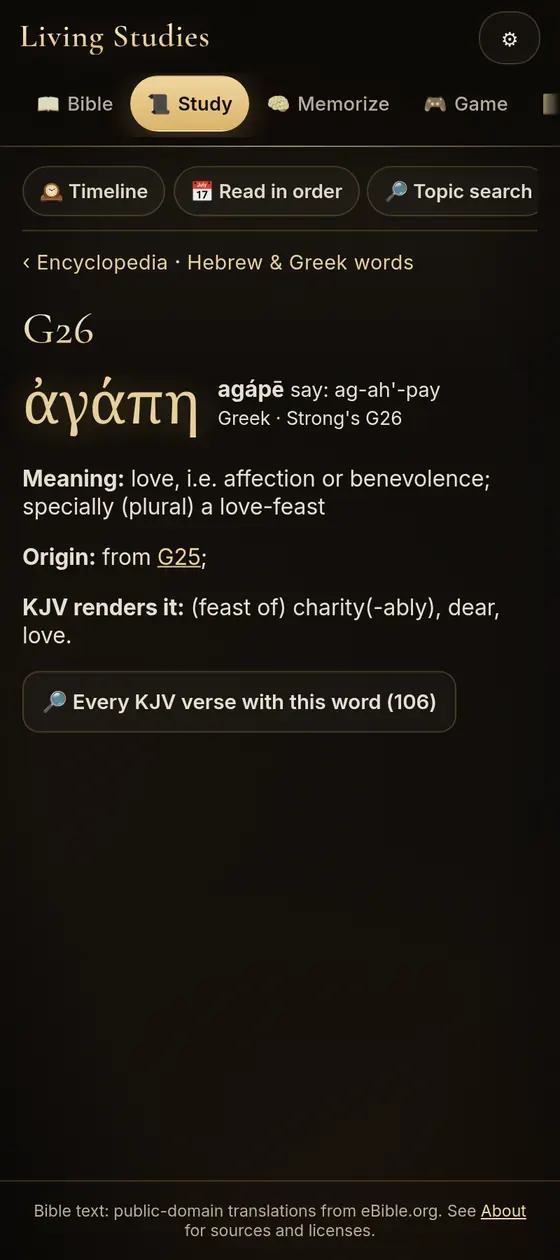
Tap a word. See the original.
8,600+ Hebrew and 5,600+ Greek dictionary entries linked to the King James text, with every verse where each word appears.
Try it: these are real entries from the app
Tap a highlighted word.
What each word shows
- The original word, its transliteration and pronunciation
- Strong's number and definition (Strong's dictionaries, 1890)
- For Hebrew, the outline of meanings from Brown-Driver-Briggs (1906)
- How the King James translators rendered it
- Every KJV verse that uses it, one tap away
Search the dictionary by English word, transliteration or Strong's number. Word study works with the King James text.
Feasts & Traditions
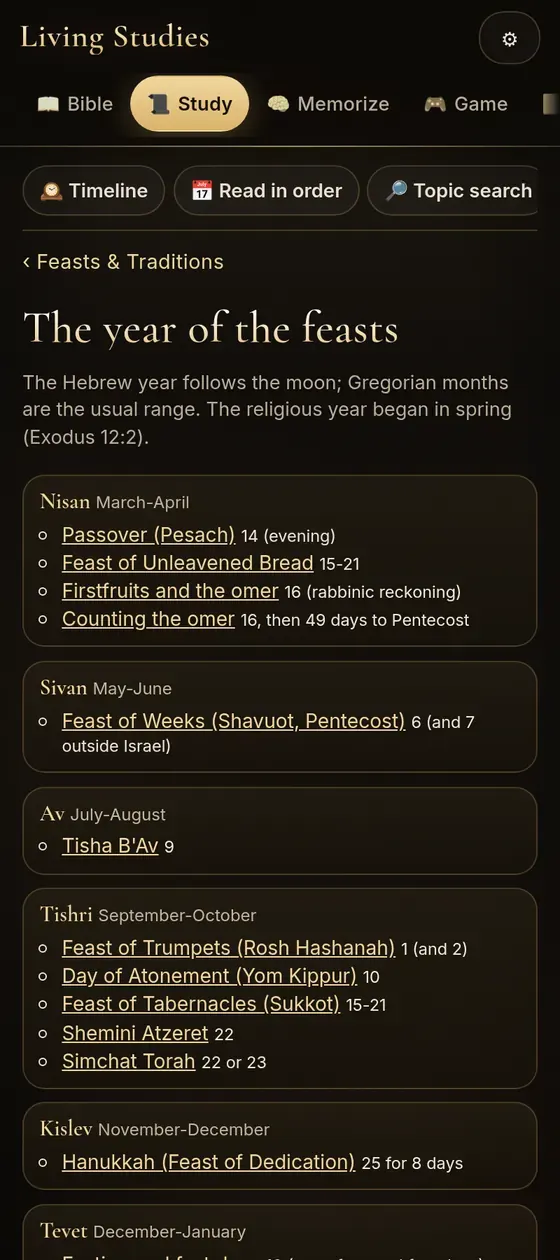
The Bible’s year, season by season.
130+ entries on the Sabbath, the feasts, the sanctuary and its offerings, daily customs and the groups of the time, with a calendar of the year.
What the entries cover
The Sabbath from creation through the Gospels and the early church, the spring and autumn feasts, the tabernacle and temple furniture, the priesthood, offerings, clean and unclean foods, vows, marriage, burial and mourning, and the writings and customs of later Judaism, each with Bible references and its sources listed.
Bible Prophecy · 18 lessons
Bible prophecy, made clear in 18 lessons.
Will the world really end? What did Jesus say would come before His return? The Whole Life’s Bible Study Book takes you through what the Bible’s prophecies say about the past, the present and the future, and lets the Bible explain itself, one verse at a time.
18 lessons and 890 Bible verses for giving you an in-depth look into the Bible and prophecy.
John on Patmos · artist’s impression (AI-generated), not a photograph
Let the Bible explain its own prophecies
Predictions about the end of the world come and go in the news, and they rarely come true. This book goes to the Bible instead. It studies one subject at a time, as a whole, and lets Scripture interpret Scripture rather than guessing. You read every verse yourself, in the King James Version, and fill in the key words as you go.
Prophecy is the thread that runs through all 18 lessons: the great conflict between Christ and Satan, the signs Jesus gave of His coming, the judgment, the second coming, what happens after it, and the message God gives the whole world in the last days.
And the book keeps one thing in front all the way through. Knowing prophecy never saves anyone. A daily walk with Jesus does.
Clear answers to real questions
The book is meant to give you a foundational understanding of the Bible and prophecy, with clear answers to questions such as:
- Is the Bible trustworthy?
- How can I be saved?
- What happens when I die?
- Why is there evil if God is good?
- How can I have a relationship with God?
- Is Hell real?
The lessons build on each other, so the book asks you to study them in order.
The book, inside Living Studies
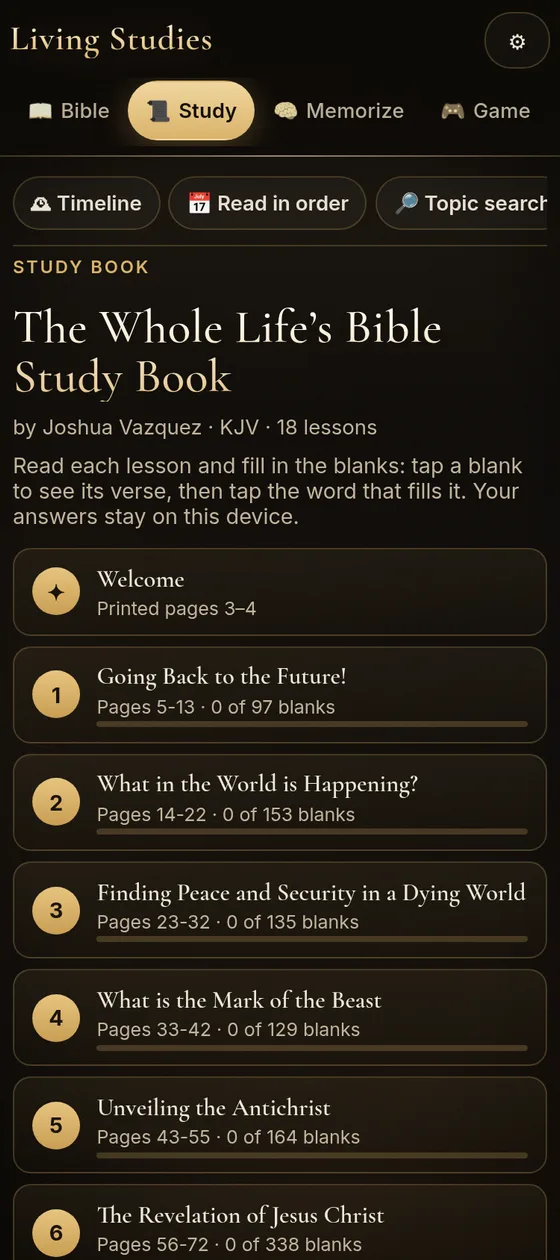
The Whole Life’s Bible Study Book by Joshua Vazquez (2020) is about 215 printed pages: a Welcome, 18 lessons, and pages for your own notes. Every verse is from the King James Version, and the book’s own charts and figures are kept.
In the app it sits in Study, under Study Book. The contents show each lesson’s progress, and Continue takes you back to where you stopped.
Who it’s for
- Anyone who has wondered what the Bible says about the future and wants to read it for themselves.
- New readers: the book is meant to give a foundational understanding, and each lesson builds on the one before.
- Groups and families: a star in the text marks where you can switch readers when you study together.
How a lesson works
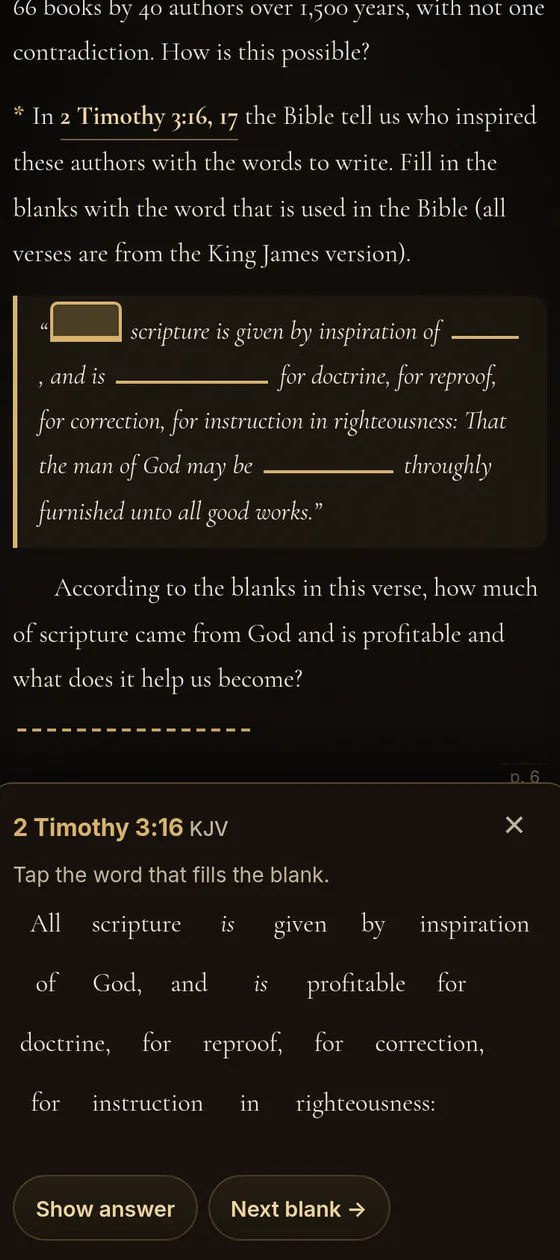
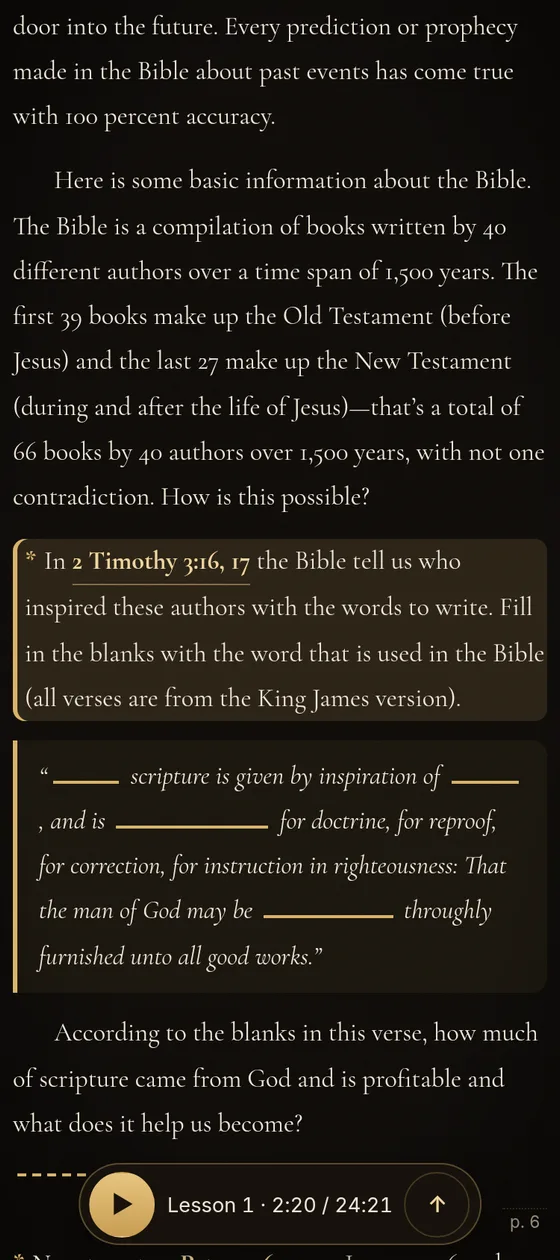
- Open a lesson and read it as it was printed, with its Bible references.
- Tap a blank. The verse it comes from opens at the bottom of the screen.
- Tap the right word in that verse. It fills the blank, is marked done, and the next blank comes up. If it’s not the right word, you’re asked to look again, and Show answer is there if you need it.
- Some blanks ask what you think. For those, you type your own answer.
- Your answers and your place are saved on your device, so you can stop and pick up where you left off.
Listen to the whole book
The Welcome and all 18 lessons are narrated. Turn on Guided mode and the text and blanks are highlighted as they’re read, so you can follow along with your eyes. Each lesson ends with a short pause for reflection.
Save a lesson’s audio for offline, and it plays with no internet.
All 18 lessons
- Welcomepages 3–4What the book is for: a foundational understanding of the Bible and prophecy, studied in order.
- 1. Going Back to the Future!pages 5–13Will the world really end? Shows why the Bible can be trusted about the future by setting its prophecy beside history, and ends with the love of God in John 3:16.
- 2. What in the World Is Happening?pages 14–22Today’s troubles beside the signs Jesus gave, and the great conflict between Christ and Satan: why love allows free choice, and why there is evil if God is good.
- 3. Finding Peace and Security in a Dying Worldpages 23–32The hard times the Bible says are still ahead, its promise that God’s people will be delivered, and the peace and freedom from sin that Jesus gives.
- 4. What Is the Mark of the Beast?pages 33–42Sets popular guesses aside and builds from Scripture instead: whoever we choose to obey, we serve. Ends with three young men who stayed faithful under pressure.
- 5. Unveiling the Antichristpages 43–55Follows the Bible’s own clues step by step, then reminds you that knowing prophecy never gives eternal life; a daily walk with Jesus does.
- 6. The Revelation of Jesus Christpages 56–72God’s law and God’s love: why actions show love, why His commandments still matter, and why we are saved by grace alone, not by keeping them.
- 7. Keep Calm and Look to Jesus!pages 73–88About rest: the Bible’s call to worship the Creator, and the rest and time with Him that God offers.
- 8. The Seal of God and the Mark of the Beastpages 89–97Walks through the week of creation and asks what sets God’s people apart in the last days, ending with a call to remember the Creator.
- 9. A Model of God’s Lovepages 98–107The sanctuary as a practical picture of a relationship with God: the steps of the journey, where it leads, and the joy in heaven when one person turns to Him.
- 10. The Rapturepages 108–116Jesus’ promise, “I will come again”: what the Bible says His return will be like, and how God keeps His people through the hard times before it.
- 11. Satan’s 1,000 Years in the Cornerpages 117–124What the Bible says happens, in order, to the saved, the lost and Satan after Jesus returns, and what the books of the judgment are.
- 12. The Oldest Lie in the Bookpages 125–133What happens when we die? Who the Bible says alone is immortal, why it calls death a sleep, and the comfort of the resurrection.
- 13. Revelation’s Final Showdownpages 134–139“What about Hell?” How the conflict between good and evil finally ends, and a God of everlasting love, not everlasting torment.
- 14. Does God Care About Our Health?pages 140–151God wants His people healthy and temperate, shown through Bible stories where food and faithfulness went together in times of trouble.
- 15. The Prophecy of 1844pages 152–162A time prophecy studied beside the story of Noah and the Day of Atonement, and what the judgment means for each person: will you let Jesus win your case?
- 16. The Testimony of Jesus Christpages 163–174The Bible’s tests for telling a true prophet from a false one, and how the book applies them to the gift of prophecy in the last days.
- 17. The Needle in the Haystackpages 175–179Sifts through the many churches in the Christian world, using the marks the Bible gives, to look for God’s remnant church.
- 18. Revelation's Three Angelspages 180–191Brings it all together: how God has led His people, the message He gives the whole world in the last days, and your part in sharing it. Closes with the blessing of Numbers 6:24-26.
Questions about the book
Do I need to know the Bible already?
No. The book is meant to give a foundational understanding of the Bible and prophecy, and each lesson builds on the one before.
Which Bible does it use?
The King James Version, for every verse in the book and in the verse panel.
Is it a separate purchase?
No. The book and its audio are part of Living Studies, with everything else in the app, at the one price on the Pricing tab.
Does it work offline?
Yes, once the app is saved for offline. Save each lesson’s audio for offline too, and it plays with no internet.
Are my answers saved?
Yes, on your device, along with your place in each lesson and your notes.
Can we study it as a group?
Yes. A star in the text marks where you can switch readers.
Who wrote it?
Joshua Vazquez, © 2020, edited by Hope Vazquez, Matthew Brown and David Brown.
Start with Lesson 1
Open the book in Living Studies.
All 18 lessons, the audio and Guided mode come with the app. One price, and no subscription is required.
Encyclopedia
Then, and now.
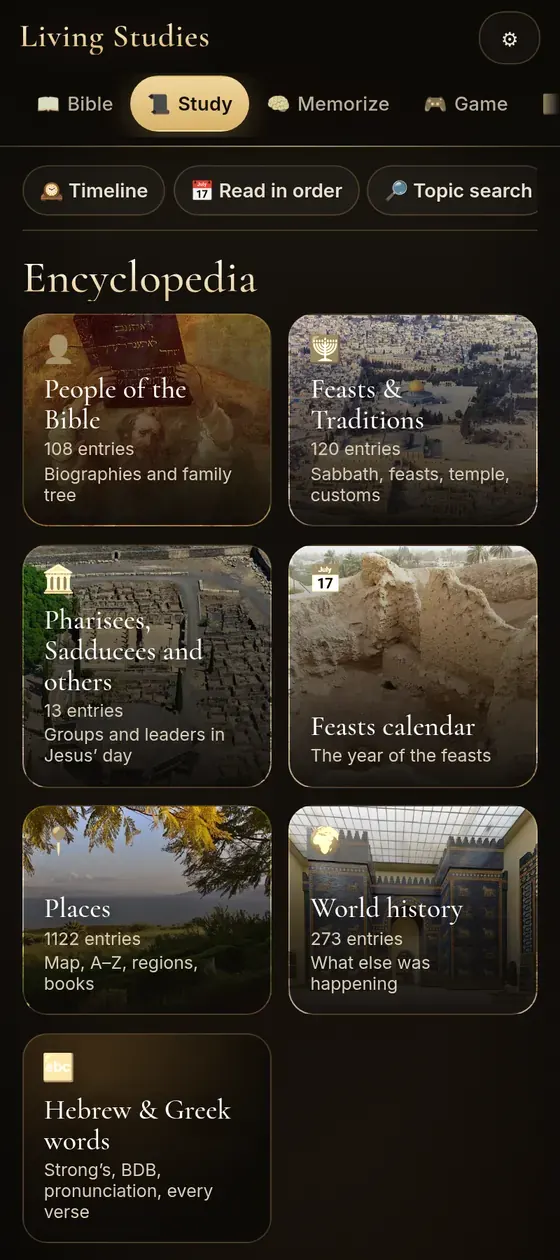
910+ entries on places, people, feasts and traditions. Each one is checked against at least two outside sources from different publishers, most against three or more, and lists them.
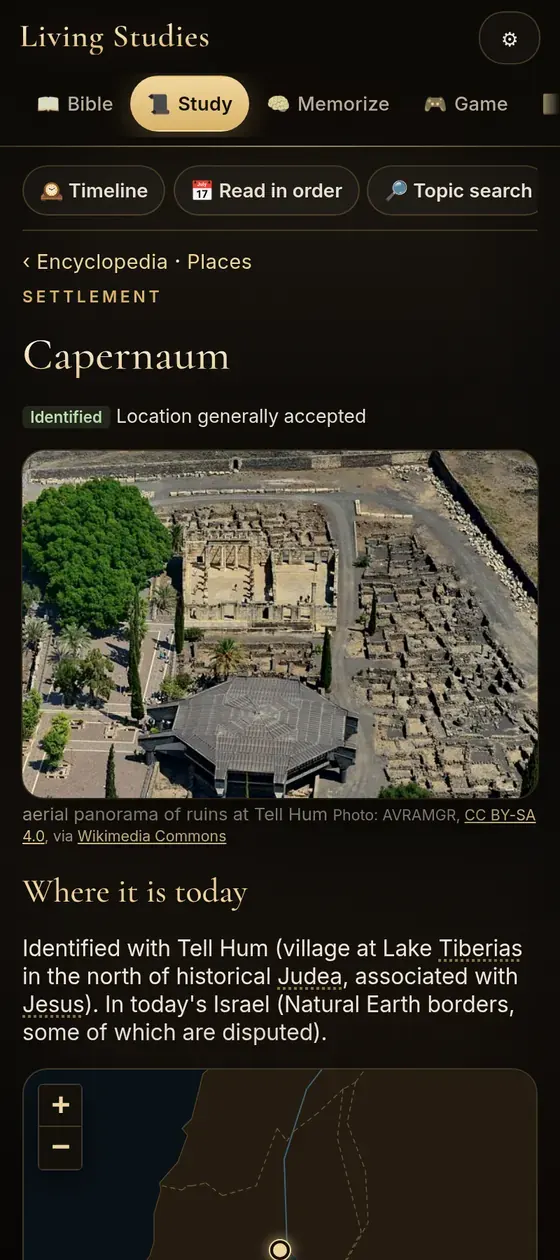
An example from the app: Capernaum
In depth: the groups of Jesus' day
Long entries cover the Pharisees, Sadducees, Sanhedrin, Essenes, scribes and more, with a side-by-side comparison:
How sources are handled
- An entry is published only when at least two outside sources from different publishers back it. Entries that fall short are held back.
- Each entry lists its sources by name with a link.
- Facts from history and archaeology are reported as the sources give them, and debated dates are marked as debated.
- Bible references are given in the text so you can read the passage yourself.
Places & Maps
Every place, on the map.
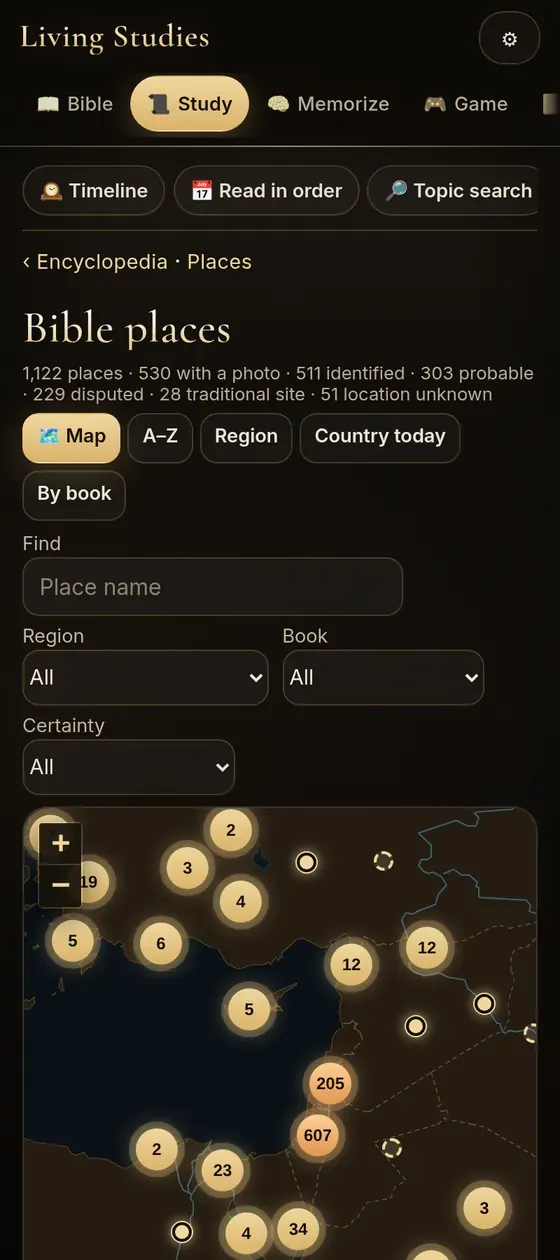
1,100+ places named in the Bible, from rivers and mountains to towns and regions, with 520+ photos of the sites today and a map that works offline.
A map you can search
Filter places by region and type, tap a point to open its entry, and zoom from the whole region to a single valley. Each place says how sure the identification is, so you can tell a certain site from a proposed one.
Every entry pairs then, what 19th-century Bible dictionaries said about it, with now, where it is identified today.
People
Meet the people of the Bible.
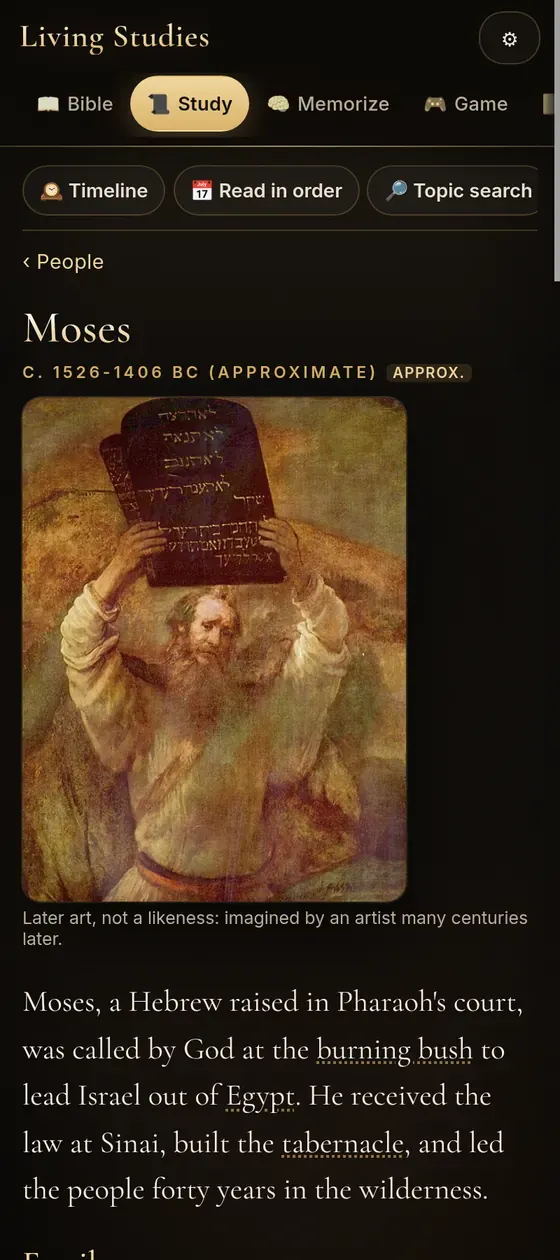
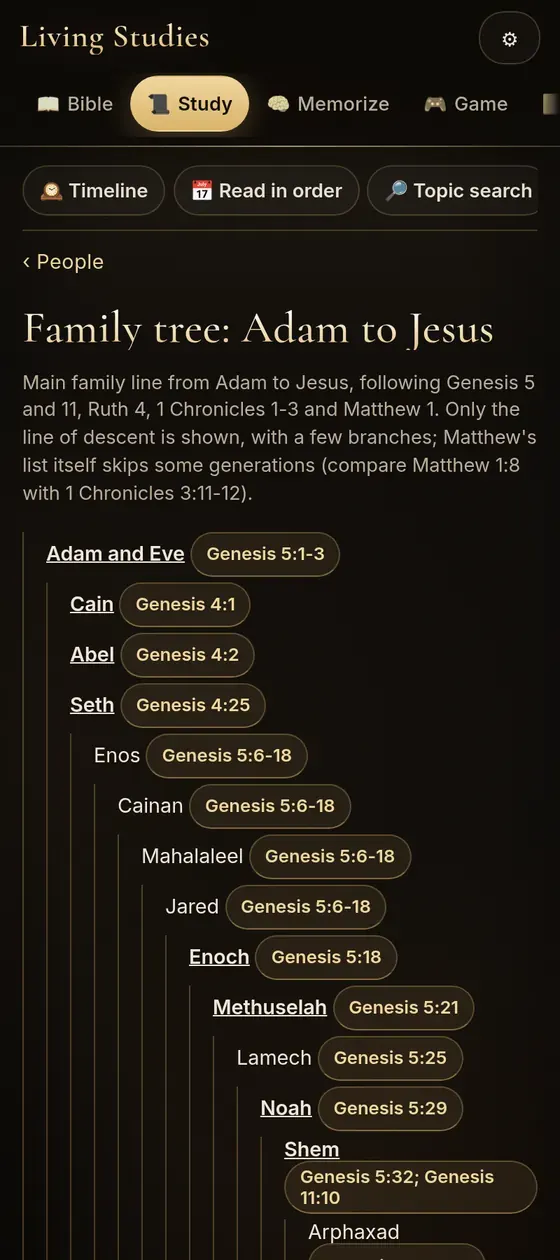
100+ biographies with family, key events, places, a timeline and Bible references, and a family tree from Adam to Jesus.
People along the story
The people are grouped in story order. The app's timeline opens before them, in heaven, and runs past them to the new earth.
Memorize & Games
Hide the word in your heart.
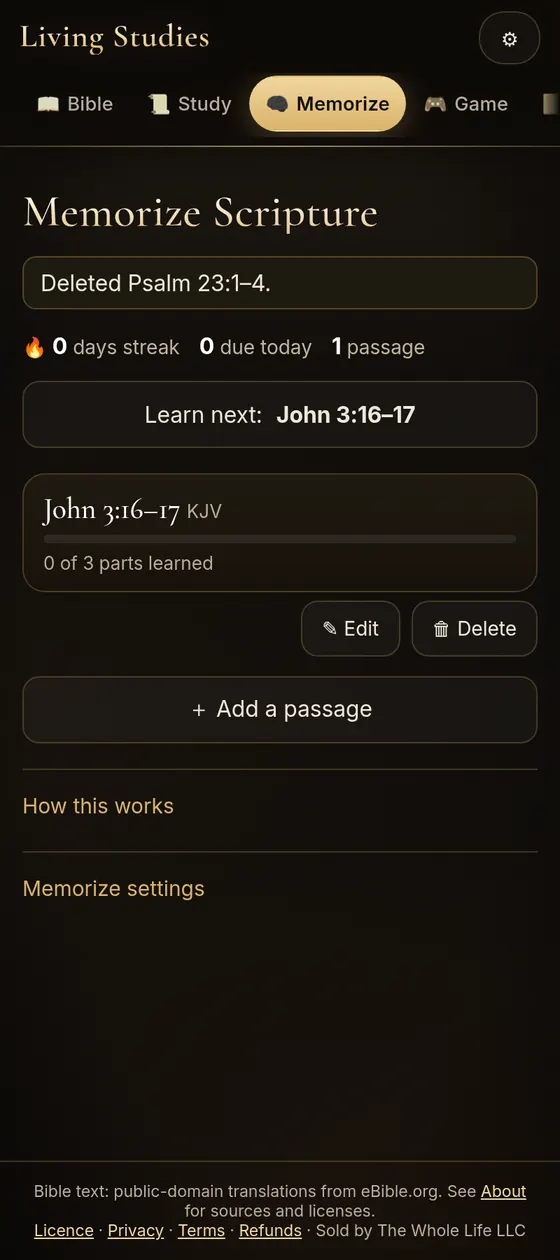
Add any passage and learn it step by step, then play five games built on Scripture.
Memorize in steps
Learning moves from reading and listening, to fading words, to first letters, to full recall. Reviews are then spaced out over days and weeks, so a verse comes back just before you'd forget it.
- Listen & read
- Fading words
- First letters
- Type
- Recall
- Speak it
- Audio only
- Reference quiz
Add, edit and delete passages in any translation.
Five games built on verses
Each game in the app's Game tab draws on the Bible text or on your own Memorize list. Swipe, drag or use the arrows to look through them.
Pricing & Buy
Buy once. Keep it.
One price for everything in the app. No subscription is required.
Test mode: these buttons open Stripe test checkouts. Use card 4242 4242 4242 4242; no money moves.
Optional
Give monthly
If you'd like to help keep Living Studies growing, you can give a little each month. Anyone can give, whether or not you've bought the app. It's never needed to use the app, and it doesn't unlock anything extra.
- Choose from $1 to $500 a month at checkout.
- Pay securely with Stripe. There's no code to enter and nothing to install.
- Stop any time with Manage or cancel your monthly support (opens Stripe), or by emailing support@livingstudies.app.
Monthly support is a payment to The Whole Life LLC, the business that makes the app, to support the work on it. See the Monthly supporter terms.
How you get it
- Add the app icon first, on your phone, tablet or computer (steps for every browser), then tap the icon to choose your plan.
- Pay securely with Stripe. We never see your card number.
- For the full app and family plans, the thank-you page shows your three-time code for 72 hours after you pay. We also email it to you from admin@thewholelife.com with your receipt.
- Tap Confirm and open the app on the thank-you page. If you bought from the app's icon, the app sets itself up, with no code to type. For another device, enter the code at livingstudies.app/code, then tap Open the app.
- Each code works 3 times, on up to 3 devices. Confirming on the thank-you page counts as one. There’s no password. A device you’ve set up keeps working and can recognise you again without using the code. Need another device after 3 uses? Write to us.
- For a computer, get your personal download from inside the app, under About › Licence and devices. Each download link works for 7 days.
- For family plans and gifts, each person gets their own invitation email and their own three-time code, and accepts it with their own email.
Prices are in US dollars. Prices are shown before you pay. All purchases are final and non-refundable. See the Refund Policy and Terms.
The files are downloaded to your computer or to your device as soon as you open the app. Therefore, the file is yours forever and therefore, there's no refund.
FAQ
Questions, answered.
Does it need the internet?
Only to install it, buy it, and let it save for offline use. The download (about 85 MB) starts by itself the first time you open the app from its icon after buying; keep the app open until it says Available offline. After that, the Bible, search, encyclopedia, maps, photos and word study work with no connection, and the app doesn't lock while you're offline. Voice search may need internet on some devices, because the device's speech service does the listening.
How do I install it and save it for offline use?
After you buy, open the app once while you're online, and it saves the Bible, encyclopedia, maps, photos and word study to your device by itself. They then keep working with no internet. That's about 85 MB on your device.
- iPhone and iPad: open the app in Safari, tap Share, then Add to Home Screen.
- Android: open it in Chrome, tap the menu, then Install app.
- Computer: in Chrome or Edge, click the install icon in the address bar; in Safari on a Mac, choose File → Add to Dock. Steps for every browser.
- After you buy, open the app from its icon while you're online. The download starts by itself. Keep the app open until the header says Available offline. If it's interrupted, it carries on when you come back to the app.
What happens to my notes and personal data?
Your study stays yours.
- Your notes, highlights, Study Book answers, memory passages, the studies you make in My Study, game progress and settings are saved on your device. We don't receive them. A study you share is sent only as a link you pass on yourself; it holds the study name, references and notes, and it doesn't go through our server.
- If you play a game online with friends (up to 8 players), our server holds the game room (display names, scores and, in Bible Hangman, the current word) in memory only while you play. It is deleted when the room closes, at most 3 hours later.
- The app may show one ad per month. This website counts visits with Cloudflare Web Analytics, which uses no cookies.
- The microphone is used only when you tap it for voice search or the Speak step. Your device's speech service may process that audio.
- When you buy, Stripe handles the payment, and we never see your card number. Stripe passes us your name, email address, phone number and billing address. We use them for your licence, receipt and three-time code.
- While you’re signed in, we keep a record of each sign-in (device, browser and rough location, never your IP address). The app also sends short, fixed records of which parts you use: sections opened, Study Book progress and listening time, games, and Memorize sessions. We do not record which Bible books, chapters or passages you read. These records are linked to your licence, email and device. They never include what you type or your IP address, and they are deleted after 180 days. See the Privacy Policy.
What devices does it run on?
It runs on iPhone, iPad, Android phones and tablets, and computers, in a modern browser. You install it from the browser to your home screen. It isn't in the App Store or Google Play.
Which Bible translations are included?
Is it a subscription?
No. The app is a one-time purchase. Monthly support is optional, and you can stop it at any time with Manage or cancel your monthly support (opens Stripe), or by emailing support@livingstudies.app.
Is there a free trial?
Not at the moment.
How many devices can I use?
Your purchase is for you, on up to 3 of your own devices at once. Your three-time code works 3 times in total, on up to 3 devices. A device you’ve set up keeps working and can recognise you again without using the code. Need another device after 3 uses? Write to us. You can remove an old device in the app under Licence and devices. Please don't share your codes. On a family plan, each person has their own licence.
How do the family plan and gifts work?
A family plan is for 3 to 12 people. You add each person's email in the app, and each of them gets their own invitation email with their own three-time code and accepts it with their own email. A gift sends each person you name an invitation email with their own three-time code (and your message, if you add one). You can buy 1 to 25 gifts at once.
Where does the encyclopedia information come from?
Each entry is checked against at least two outside sources from different publishers, most against three or more, and lists them. They include public-domain Bible dictionaries (Easton, Smith, Schaff), Josephus, older encyclopedias, and modern references used to check facts. See Credits & Sources.
Are the paintings real portraits?
No. They are public-domain paintings from later centuries, labelled in the app as later art, not likenesses. Place photos are real photographs of the sites today.
Can I get a refund?
All purchases are final and non-refundable. The files are downloaded to your computer or to your device as soon as you open the app. Therefore, the file is yours forever and therefore, there's no refund. If you were charged by mistake, or charged twice, or something is wrong with your purchase, email us and we will look at it and fix it. See the Refund Policy.
Who makes it?
The Whole Life LLC. Write to support@livingstudies.app.
Credits & Sources
Credit where it's due.
This app stands on the work of translators, scholars, mapmakers and photographers. Here they are.
Text and data in the app
| What | Source | Licence |
|---|
Software in the app
Photos and paintings on this website
The app itself credits every one of its 520+ place photos and 50+ paintings by name and licence, under each image and on its About page.
This website
- Fonts: Cormorant Garamond (The Cormorant Project Authors) and Inter (The Inter Project Authors), SIL Open Font License 1.1 (licence, licence).
- Map outline on the Places tab: Natural Earth, public domain. Place locations: OpenBible.info, CC BY 4.0.
- The John on Patmos clip on the Bible Prophecy tab and the story pictures on the home page: AI-generated artist’s impressions, not photographs or archaeological reconstructions.
- App screenshots: taken from the app.
Terms of Use and Terms of Sale
Last updated: October 29, 2026
1. Who we are
Living Studies (“the app”) is made and sold by The Whole Life LLC, a Florida limited liability company (“we”, “us”, “our”).
Address: 7901 4th St N, STE 300, St. Petersburg, FL 33702
Email: support@livingstudies.app
Website: https://livingstudies.app
App: https://app.livingstudies.app
2. Agreeing to these terms
These terms are a binding agreement between you and The Whole Life LLC. By buying, accepting a gift or family-plan invitation, or using the app, you agree to these Terms of Use and Terms of Sale, the Licence terms, the Refund and Cancellation Policy, and (if you choose monthly support) the Monthly Supporter terms. Our Privacy Policy explains how we handle information. If you do not agree, do not buy or use the app.
3. What you can buy
| What | Price | What you get |
|---|---|---|
| Full app | One-time payment; see Pricing | A personal, non-transferable licence for one person, usable on up to 3 devices concurrently. No subscription. |
| Family plan | One-time payment per person, 3 to 12 people; see Pricing | One licence place for the buyer plus a separate personal licence place for each invited person. Each person receives their own invitation by email and signs in with their own email address. |
| Gift download | One-time payment per gift, 1 to 25 gifts per order; see Pricing | Each person you name at checkout receives their own invitation by email (with your optional gift message). Each gift is a full-app personal licence for that person. |
| Monthly support (optional) | $1 a month for each unit you choose, 1 to 500 units ($1 to $500 a month) | A voluntary monthly payment to support continued development of the app. It does not unlock features, grant a licence, or change what the app does. |
Current prices, in US dollars, are on the Pricing page. The app works fully without monthly support. Prices are shown before you pay.
4. Paying
Payments are processed by Stripe. You enter payment details on Stripe’s checkout page; we never see or store your full card number. Stripe’s terms and privacy policy apply to the payment transaction.
5. How you get the app
- After you pay for the full app or a family plan, the thank-you page displays your three-time activation code (example format: ABCD-EFGH-JKLM-NPQR). We also email it to you from admin@thewholelife.com with your receipt.
- On the thank-you page, you tap “Confirm and open the app.” This uses one of the code’s three uses and activates the licence on that device. If you bought from the app on that device, the app sets itself up; you do not need to type the code. To activate another device, you enter the code at livingstudies.app/code, which also offers a personal download.
- Gift recipients and family-plan members receive their own invitation email and their own code. They accept the invitation with an email address and a 6-digit sign-in code we email them (sign-in codes expire after 10 minutes), or by entering their three-time code at livingstudies.app/code.
- There is no password, and you do not sign in with your email address on your own devices. A device you have already activated can be recognised again without using your code (for example, if your browser clears the app’s saved sign-in).
- Personal download links are valid for 7 days. You can generate a new one from within the app at any time while your licence is active.
6. Your sign-in
Because there is no password, anyone who has your three-time code, or who can access the email it was sent to, can use it to activate a device. You are responsible for keeping your email account and devices secure and for not sharing codes. Contact support@livingstudies.app immediately if you believe someone else is using your licence.
7. Offline use
Once a device is activated, the app saves the Bible, encyclopedia, maps, photos, and word study on that device by itself (approximately 85 MB). This needs an internet connection the first time: you open the app while online (on a phone or tablet, from its home-screen icon) and keep it open while it saves. If saving is interrupted, it continues when you return to the app or your connection returns. After that, these parts function without an internet connection, and the app does not lock when the device is offline. Study Book narration is saved one chapter at a time, when you choose to save it. Your device verifies the licence when it is online. Activating a new device requires an internet connection and our licence service to be available. Voice search may require an internet connection because your device’s speech service performs the recognition. These technical checks are measures to enforce the licence; they do not guarantee perpetual offline functionality if the licence is later paused or terminated.
8. Please don’t
- Share your codes, sign-in credentials, or personal download with anyone who has not purchased the app or received a valid place or gift.
- Sell, rent, lend, or redistribute the app, your download, or its compiled content (including the encyclopedia or the Study Book).
- Circumvent the sign-in, device limit, or licence checks, or remove the “Licensed to” name or any hidden mark from a download.
- Use automated tools to copy substantial portions of the app’s content, or attack, overload, or probe our servers.
- Use the app in violation of applicable law.
Online games: up to 8 players can join a room, and each player needs their own licence and an internet connection. There is no chat. Please choose kind display names and words. We may close a room or limit a device that misuses online play.
9. Who owns what
The app’s design, software, and the encyclopedia and other content as compiled by us are owned by The Whole Life LLC. The Bible Study Book in the app is Copyright © 2020 Joshua Vazquez and is included with permission. Some material belongs to others or is in the public domain and is subject to its own licence (for example, certain Bible texts and Creative Commons photos). Those underlying licences continue to apply; nothing in these terms removes any rights they grant you. You receive only a personal, non-transferable licence to use the app as described in the Licence terms; you do not acquire ownership of the software or compiled content, and you may not transfer or assign that licence.
10. A study aid
We check encyclopedia entries against outside sources, but dates, place identifications, and scholarly views can be uncertain or debated, and errors are possible. Notes about history and other faiths are provided for study and comparison only. Verify important points against the Bible text and the sources listed in each entry, and report any errors you find. The app is a study aid only. It is not religious, professional, academic, or legal advice and does not represent any church or organization.
11. Changes to the app and the service
We may update the app to fix problems, add content, or change features. We will make reasonable efforts to keep the licence service available, but we do not guarantee uninterrupted operation. If we permanently discontinue the licence service, we will email you at least 30 days in advance and, if practical, release a final version that works without sign-in for existing licensed users.
12. Pausing or ending a licence
We may pause or terminate a licence (and associated codes and downloads) if the purchase is refunded, a chargeback is opened, the licence is being shared in violation of these terms (after we first attempt to contact you at the email on the licence), or you materially breach these terms.
13. Refunds
All purchases are final and non-refundable, as described in the Refund and Cancellation Policy.
14. No promises beyond these terms (“as is”)
To the fullest extent permitted by law, the app is provided “as is” and “as available.” We do not warrant that it will be error-free, uninterrupted, or fit for a particular purpose.
15. Limit on our liability
To the fullest extent permitted by law, our total liability for any claim relating to the app is limited to the amount you paid us for the specific purchase giving rise to the claim. We are not liable for indirect, incidental, special, consequential, or punitive damages (including lost data or lost profits). Nothing in these terms limits consumer rights that cannot be limited under applicable law.
16. Disputes and governing law
Please contact support@livingstudies.app first so we can try to resolve the issue. These terms are governed by the laws of the State of Florida, without regard to conflict-of-laws principles. Any dispute arising out of or relating to these terms or the app that is not resolved informally shall be brought exclusively in the state courts of Pinellas County, Florida, or the United States District Court for the Middle District of Florida (Tampa Division), and you consent to personal jurisdiction in those courts. Either party may bring an individual claim in small-claims court if the claim qualifies.
17. Changes to these terms
We may update these terms and will revise the date at the top. The version in effect at the time of your purchase governs that purchase. For monthly support, we will provide notice before a material change to the price or terms takes effect, and you may cancel.
18. General
These terms (together with the Licence terms, Refund and Cancellation Policy, Monthly Supporter terms if applicable, and Privacy Policy) constitute the entire agreement between you and us regarding the app and supersede any prior agreements on that subject. If any provision is held unenforceable, the remaining provisions continue in full force. We may assign these terms; you may not. Sections that by their nature should survive (including ownership, licence restrictions, liability limits, and dispute resolution) survive termination of your licence. We are not liable for delays or failures caused by events beyond our reasonable control. These terms do not create any third-party beneficiary rights.
19. Contact
The Whole Life LLC
7901 4th St N, STE 300
St. Petersburg, FL 33702
support@livingstudies.app
Privacy Policy
Last updated: October 29, 2026
This policy explains what The Whole Life LLC (“we”) collects when you visit livingstudies.app, purchase Living Studies, and use the app, and why. Contact: support@livingstudies.app, 7901 4th St N, STE 300, St. Petersburg, FL 33702.
The short version
- Your notes, highlights, answers, memory passages, the studies you make in My Study, and reading progress are stored on your device. They stay there unless you choose to share a study.
- Stripe handles payments. We never see or store your full card number.
- We keep your email, name, purchase details, and the devices you have signed in on so we can deliver the app, authenticate you, and enforce licence limits.
- When you sign in or the app checks your licence, we record the time, device/browser information, and a rough location (city, state/region, country estimated by Cloudflare). These records do not include your IP address and are deleted after 180 days.
- While you are signed in, the app sends us short usage records (which sections you open, Study Book progress and listening time, games, and Memorize sessions). They never say which Bible books, chapters or passages you read, never include text you type or your IP address, and they are deleted after 180 days.
- If you play a game online with friends (up to 8 players), our server holds the game room (display names, scores, and in Bible Hangman the word being guessed) in memory only while it is open. It is deleted 30 minutes after the last play, or after 3 hours at most. It does not include your IP address or email.
- This website (livingstudies.app) counts visits with Cloudflare Web Analytics, which does not use cookies.
- We do not sell your information and do not use it for advertising. The app may show one ad per month. It has no advertising or tracking cookies.
Visiting this website
We use Cloudflare Web Analytics to count visits to livingstudies.app. It does not set cookies or use your browser’s storage, and it does not follow you across other websites. It gives us totals such as pages viewed, the site that linked to us, browser and device type, and country. We use these totals only to see how the website is used and to improve it. Cloudflare’s privacy policy applies to the data it processes.
When you buy
Stripe collects payment details and shares with us your name, email address, purchase details (what you bought, quantity, amount paid), and Stripe reference numbers. If collected at checkout, Stripe also shares your phone number and billing address. For gifts we receive the recipients’ email addresses, your optional gift message, and the sender name you provide. For family plans we receive the email addresses you invite. We use this information to deliver what you purchased, send receipts, codes, and invitations, provide support, process refunds and disputes, and retain records required by tax and accounting law.
Signing in and your devices
We maintain a record of your licence (email, “Licensed to” name, licence type, and status) and of each device you sign in on: a device label (for example, “iPhone · Safari”), a device identifier we generate, and timestamps for when it was added and last used. We use this to authenticate you, display your devices so you can remove one, and enforce the concurrent 3-device limit. On a device you have activated, the app (at app.livingstudies.app) keeps a signed sign-in ticket in a cookie that the app’s page scripts cannot read, plus a small cookie that only says a saved sign-in exists. They last up to 400 days and are used only to recognise that device again if your browser clears the app’s other saved data. Signing out, removing the device, or the licence being turned off clears them. Sign-in codes (used when you accept a gift or family-plan invitation) are stored only in one-way hashed form. Activation (three-time) codes are stored in one-way hashed form; for paid full-app and family orders we also keep an encrypted copy of the code so the thank-you page can show it to you after checkout. The thank-you page shows it only for 72 hours, but the encrypted copy is kept until that code is replaced (for example, when we issue you a new code) or your licence record is deleted. Your codes are also included in the emails we send you, and copies of those emails are kept in our Microsoft 365 mailbox.
Sign-in records
When you request a sign-in code, sign in, or the app checks your licence, we record the time, your email and licence name (if available), device name, browser and operating system, and rough location (city, state/region, and country as estimated by Cloudflare). We use these records for customer support and to detect licence misuse. These records do not include your IP address and are automatically deleted after 180 days.
Blocking repeated wrong tries
To stop people from guessing codes or flooding our sign-in and order pages, we keep a scrambled (one-way hashed) form of your IP address, and for sign-in requests of your email address, together with a short counter. The scrambled form cannot be turned back into your IP address. These counters are not automatically deleted; each one is simply overwritten the next time the same address is counted. Cloudflare, which hosts our services, also processes your IP address to deliver them.
How the app is used (usage analytics)
While you are signed in, the app sends us short, fixed records of how it is used: which sections you open, Study Book progress (how far you have read in each lesson and how many blanks you have filled in) and listening time, games, and Memorize sessions. We do not record which Bible books, chapters, verses or passages you read, or what is in the studies you make in My Study. These records are linked to your licence, email, and device. They never include text you type (such as notes or answers) and do not include your IP address. We use them to understand which parts of the app are used and to improve it. They are automatically deleted after 180 days. Nothing is sent while you are signed out. (The short-lived online game room described under Online games does hold the word you type for Bible Hangman, only until that round ends.)
Inside the app, on your device
Your memory passages and practice history, game and quiz progress, highlights and notes, Study Book answers, notes and reading place, the studies you make in My Study, reading position, and settings are stored locally in your browser’s storage. Their contents are not sent to us (except while you play a game online with friends; see Online games). The usage records described above include only counts and positions, never the text of your notes or answers. Clearing your browser’s data for the app removes them; we cannot restore them.
When you share a study from My Study, the app makes a link that holds the study’s name, its Bible references, and your notes for it. Nothing about you or your device is in the link. You decide where to send it. The study is carried in the part of the link after the “#”, which browsers do not send to our server, so we do not receive it when someone opens the link. Anyone who has the link can read that study.
Online games
When you host or join an online game, we keep a game room on our server so everyone sees the same game. It holds the room code, the display name you type, a scrambled (one-way hashed) device identifier, your moves, scores and times, and in Bible Hangman the word or phrase the chooser types and its clue. The other players in the room see your display name and scores, and at the end of each Hangman round the word that was chosen. The room is kept in memory only and is never written to a database. It is deleted 30 minutes after the last play, or 3 hours after it was made at the most. The Hangman word is erased when its round ends. We do not store your IP address or email with the room. Up to 8 players can join a room. Online games have no chat.
Microphone
The microphone is used only when you explicitly activate it for voice search or the Speak step in Memorize. Speech recognition is performed by your browser or device. Some devices send audio to Apple’s or Google’s speech service under their own privacy policies. The app receives only the resulting text. We do not receive or store audio recordings.
Read-aloud and audio
Read-aloud uses the voices built into your device. Study Book narration is pre-generated computer-generated audio streamed from our server.
Your personal download
Each personal download displays your name inside the app (“Licensed to …”) and includes a hidden mark linking that copy to your licence. This mark is used solely to help us detect unauthorized redistribution of downloads.
Who we share information with
- Stripe — payment processing
- Cloudflare — hosting the website, app, licence server, and online game rooms, and storing our database; also provides the rough location estimate and counts website visits (Cloudflare Web Analytics)
- Microsoft 365 — sending emails and holding our mailbox
- Apple or Google — speech recognition only if you use the microphone feature
Who can see it here
Access to customer records is limited to the owner and individuals or tools working for us under confidentiality obligations. Administrative actions are logged.
How long we keep it
- Sign-in records: 180 days
- Usage records: 180 days
- Online game rooms: until the room closes (at most 3 hours)
- Sign-in codes: they work for 10 minutes; the hashed copy is deleted when the code is used, after too many wrong tries, or when it is next checked or replaced after it expires
- Encrypted copy of a paid order's three-time code: until the code is replaced or your licence record is deleted
- Scrambled IP and email counters used to block repeated wrong tries: not automatically deleted; overwritten each time the same address is counted
- Orders and payment records: as long as tax and accounting rules require (typically 7 years)
- Licence and device records: while your licence exists, then as required by law
- Copies of emails we sent and messages you send us: as needed for support and record-keeping
Your choices and rights
You may request access to, correction of, or deletion of the information we hold about you, or a copy of it, by emailing support@livingstudies.app from the email address associated with your purchase or sign-in. We will respond within a reasonable time. We may retain certain records where required by law. Deleting licence records will end your ability to sign in.
Children
Purchases must be made by an adult. If a family plan includes children, the adult purchaser provides and manages their email addresses. The app is not directed at children under 13. Online play shows other players only the display name a player types; there is no chat.
People outside the United States
We are based in the United States. Our service providers may process information in the United States and other countries. If you are located in the European Economic Area, United Kingdom, or another jurisdiction with specific data-protection rights, you may have additional rights; contact us at support@livingstudies.app to exercise them.
Security
We use reasonable technical and organizational measures to protect the information we hold. No method of transmission or storage is completely secure.
Changes to this policy
If we change this policy, we will update the date at the top. For material changes we will notify you in the app or by email.
Contact
The Whole Life LLC
7901 4th St N, STE 300
St. Petersburg, FL 33702
support@livingstudies.app
Refund and Cancellation Policy
Last updated: October 29, 2026
Refunds. All purchases of Living Studies are final and non-refundable. This covers the one-time app purchase, family plan purchases, gift purchases, and optional monthly support. Because the app is a digital product that you can use right away, we do not give refunds once your purchase is complete.
The files are downloaded to your computer or to your device as soon as you open the app. Therefore, the file is yours forever and therefore, there's no refund.
Monthly supporters can cancel any time with the manage or cancel link in their Stripe receipt or the manage link on this site; cancelling stops future charges but does not refund past ones. If you were charged by mistake, or charged twice, or something is wrong with your purchase, email us and we will look at it and fix it. This does not limit any rights you have under the law where you live.
Monthly support
Monthly support is a voluntary payment to support the app. It is not a charitable donation and is not tax-deductible. You may cancel at any time using the manage or cancel link on our site or in your Stripe receipt, or by emailing support@livingstudies.app; future charges will stop. Past monthly payments are not refunded.
If a payment is reversed
If a payment is reversed through Stripe (for example, a mistaken charge we refund, or a chargeback), the licence, three-time code, and download link for that purchase are turned off. The next time the app on each of your devices checks the licence online, it shows that the licence is turned off.
Chargebacks
If you dispute a charge with your bank or card issuer, the licence associated with that purchase is paused while the dispute is open. If the dispute is resolved in our favor, the licence is restored. Please contact us first; we are happy to assist.
Timing
If we refund a mistaken or duplicate charge, Stripe typically returns it to your card within 5 to 10 business days, depending on your bank.
Licence terms
Last updated: October 28, 2026
When you purchase the app, accept a gift, or accept a family-plan invitation, you receive a personal, non-transferable, non-exclusive licence to use Living Studies for your own personal, non-commercial study, for as long as your licence remains active. You may not assign, transfer, or sublicense this licence.
Devices
- You may be signed in on up to 3 devices concurrently. The app lists your devices under Licence and devices so you can remove one.
- Each device continues to function offline, with no limit on how long it stays offline. It verifies the licence when it is online.
- The app’s access pass to its protected files lasts 48 hours and renews automatically while you are online. Files already saved on your device keep working offline after it expires.
Your three-time code
- Each licence includes a three-time activation code that may be used a total of 3 times, on up to 3 different devices.
- After the three uses, contact us if you need the app on another device. A device you have already activated keeps working, and it can be recognised again without using your code.
- If you lose or believe your code has been compromised, contact us; we can reset or reissue it.
Family plans
- A family plan contains 3 to 12 places. The buyer holds one place and invites each additional person by email from within the app.
- Each person receives their own invitation, their own code, and their own separate personal licence, and accepts the invitation with their own email address.
- The buyer manages the plan and may remove a person and invite a replacement.
- The buyer is responsible for the email addresses of any children on the plan.
Gifts
- Each gift is a full-app personal licence for one person. The person named at checkout receives an invitation email containing your optional message.
- The recipient may accept the gift with any email address they choose.
- You may give a gift away, but you may not sell gifts or codes. The resulting licence remains personal and non-transferable to the recipient.
Your personal download
A downloaded copy is generated for you. It displays your name inside the app (“Licensed to …”) and contains a hidden mark linking that copy to your licence. Do not share it.
When a licence can be paused or turned off
We may pause or terminate a licence if the purchase is refunded, a chargeback is opened, the licence is being shared in violation of these terms (after we first attempt to contact you at the email on the licence), or you materially breach these terms.
Monthly supporter terms
Last updated: October 29, 2026
- What it is. Monthly support is an optional, voluntary payment to help us continue developing Living Studies. You choose $1 per month multiplied by a quantity from 1 to 500 ($1 to $500 per month).
- What it isn’t. It does not purchase a licence, unlock features, or alter the functionality of the app. The app is a one-time purchase and functions fully without monthly support.
- Not a charity. The Whole Life LLC is a for-profit business, not a registered charity. Monthly support is a payment to a business, is not tax-deductible, and we do not issue tax receipts. Consult your own tax adviser regarding your situation.
- How it’s charged. Stripe charges your chosen payment method once a month, beginning on the day you sign up, until you cancel.
- Cancelling. You may cancel at any time using the manage or cancel link on our site or in your Stripe receipt, or by emailing support@livingstudies.app. Cancellation takes effect at the end of the then-current billing period; no further charges will be made after that.
- Refunds. Past monthly payments are not refunded. Cancelling stops future charges but does not refund past ones. If you were charged by mistake, or charged twice, email us at support@livingstudies.app and we will look at it and fix it.
- Changes. We will notify you before any change to the amount or these terms takes effect, and you may cancel.
Audio and AI-voice disclosure
Last updated: October 27, 2026
About the Study Book narration
The narration of The Whole Life’s Bible Study Book in Living Studies is entirely computer-generated. It is read by a synthetic voice created with an open-source text-to-speech model (Kokoro-82M, voice “af_heart”), not by a human reader, and it is not the voice of the author or any real person. The words are the book’s own text, with minor adjustments for natural spoken delivery (for example, Bible references are spoken in full). A computer-generated voice may mispronounce names or place stress differently from a human reader; the printed text in the app is the authoritative version. Read-aloud features elsewhere in the app use your device’s built-in voices.
Contact
Questions, a problem with a purchase, or an error in an entry? Write to us. Please include the email you bought with, and for errors, the entry and what looks wrong.
The Whole Life LLC